Components · Layout
Card
Surface container for grouping related content. Supports flat, surface, and interactive variants.
import { Card } from '@nexub/react';Playground
Playground
LiveCards group related content on a raised surface.
<Card variant="surface" />Examples
Default
Variants
Card link
The whole card is one link named by its title. The button sits above the link with `relative z-[1]`.
Sheen
Move the pointer over the card.
Props
| Prop | Type | Default | Description |
|---|---|---|---|
| variant | 'flat' | 'surface' | 'interactive' | 'flat' | interactive lifts 2px on hover (spatial spring, elevation 1 → 2), sinks to 0.99 on press and adds a state layer. Use it for cards that are links or buttons. |
| effect | 'none' | 'sheen' | 'none' | Opt-in. sheen is a soft light that follows the pointer, with a brighter rim near the edge. Off for touch, reduced motion and reduced transparency. |
| tone | ToneValue | undefined | Applies a semantic left-border accent. |
| asChild | boolean | false | Merges props onto the immediate child element. |
| surface | 'solid' | 'glass' | 'solid' | Liquid-glass material treatment — see Foundations → Materials. |
| CardLink | AnchorHTMLAttributes & { asChild?: boolean } | — | Put it around the card title to make the whole card one link. Its ::after covers the card and the card shows the focus ring. Give other controls inside the card relative z-[1]. Use asChild for a router link. |
Accessibility
ARIA roles
Keyboard
- Tab
Focuses interactive children. The card itself is never focusable; with a CardLink, the link is.
Focus
With a CardLink inside, the focus ring is drawn on the card, not around the title.
Prefer CardLink over wrapping the whole card in `<a>`: the link’s accessible name stays the title instead of every word on the card.
Screen reader
Group related content with a heading inside the Card so AT users can navigate by heading level.
On iOS & Android: Card
import { Card } from '@nexub/react-native';

<Card onPress={open} accessibilityLabel="Savings, 2,400 dollars">…</Card>
Web vs mobile
Same tokens and prop names. Where the platforms differ:
| Web | iOS & Android | |
|---|---|---|
| Interaction | variant="interactive" lifts on hover; CardLink makes it one link. | onPress makes the whole card one pressable with an accessibility label. |
| Surface | flat, surface, interactive; glass. | Tonal Surface tiers and elevation; glass on iOS 26+. |
Interactive preview of @nexub/react-native rendered for the web. Native chrome (switches, pickers, Liquid Glass) looks like the platform on a device.
On device
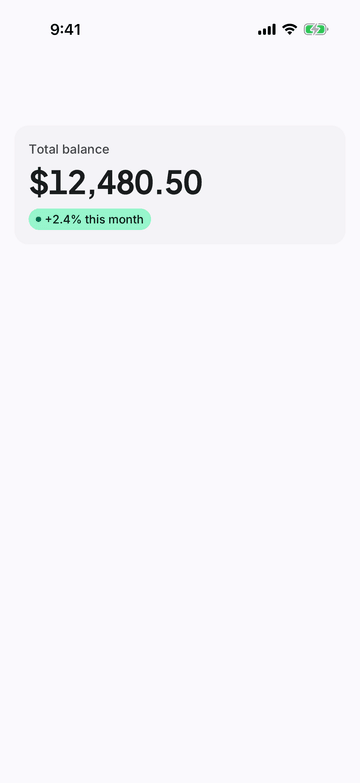
iPhone (iOS simulator)
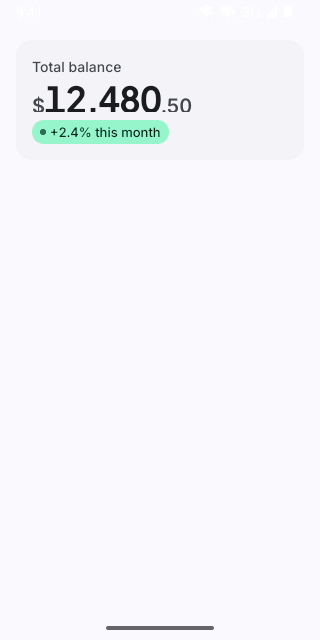
Pixel (Android emulator)
Screenshots from the latest CI run of the showcase app; the live frame renders the same code for the web.
Card props
| Prop | Type | Default | Description |
|---|---|---|---|
| onPress | () => void | — | Makes the whole card one pressable target (navigates to detail). |
| accessibilityLabel | string | — | Accessible name when pressable. |