Components · Mobile only · Lists
Swipeable Row
AlphaiOS & Android
Swipe a row to reveal actions; every swipe action is also an accessibility action.
Usage
@nexub/react-native
import { SwipeableRow } from '@nexub/react-native';

<SwipeableRow label="Amazon" actions={[{ label: 'Archive', onPress: archive }, { label: 'Delete', tone: 'danger', onPress: del }]}>…</SwipeableRow>Interactive preview of @nexub/react-native rendered for the web. Native chrome (switches, pickers, Liquid Glass) looks like the platform on a device.
On device
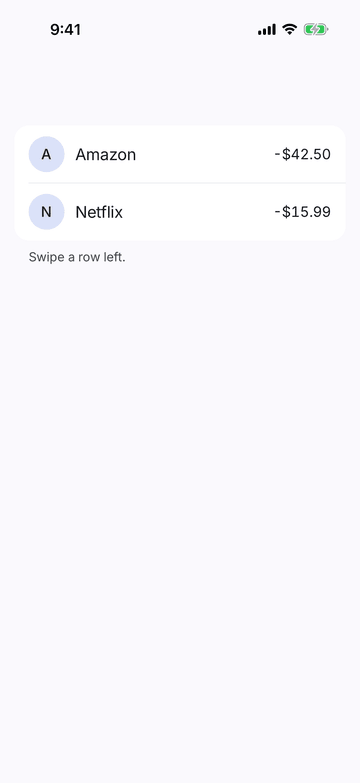
iPhone (iOS simulator)
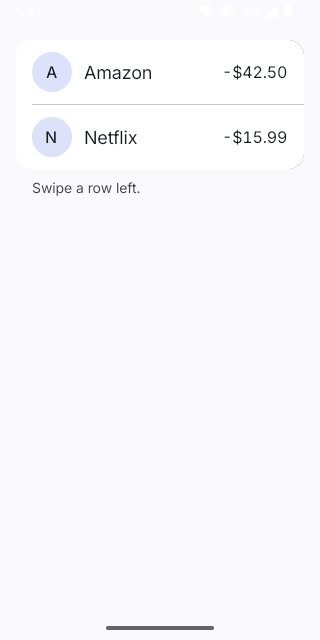
Pixel (Android emulator)
Screenshots from the latest CI run of the showcase app; the live frame renders the same code for the web.
SwipeableRow props
| Prop | Type | Default | Description |
|---|---|---|---|
| labelrequired | string | — | Accessible name of the whole row, e.g. "Amazon, minus $42.50, today". |
| onPress | () => void | — | Tap / double-tap action of the row (open details). |
| actionsrequired | SwipeAction[] | — | Revealed by swiping toward the start edge. Each one is also an accessibility action. |
| childrenrequired | React.ReactNode | — | — |
| style | StyleProp<ViewStyle> | — | — |