Components · Feedback
Alert
Inline contextual message with optional title, icon, and dismiss action.
import { Alert } from '@nexub/react';Usage
Communicating system status, errors, or success after an action
Showing inline validation feedback inside a form
Warning the user about a potentially risky operation
Providing contextual information relevant to the current page
Transient messages — use Toast for ephemeral notifications
Blocking the user for a required decision — use AlertDialog
Marketing or promotional messaging
Replacing empty states — use EmptyState instead
Examples
Default
Tones
Dismissible
Props
| Prop | Type | Default | Description |
|---|---|---|---|
| tone | 'neutral' | 'info' | 'success' | 'warning' | 'danger' | 'neutral' | Semantic colour tone of the alert. |
| title | string | — | Bold title rendered at the top of the alert. |
| icon | ReactNode | — | Custom icon rendered to the left of the content. |
| action | ReactNode | — | Action element (e.g. a button) rendered beside the content. |
| onClose | () => void | — | When provided, renders a close button that calls this handler. |
On iOS & Android: Banner
import { Banner } from '@nexub/react-native';

<Banner tone="info">Transfers over S$5,000 take one working day.</Banner>
Web vs mobile
Same tokens and prop names. Where the platforms differ:
| Web | iOS & Android | |
|---|---|---|
| Name | Alert. | Banner. |
Interactive preview of @nexub/react-native rendered for the web. Native chrome (switches, pickers, Liquid Glass) looks like the platform on a device.
On device
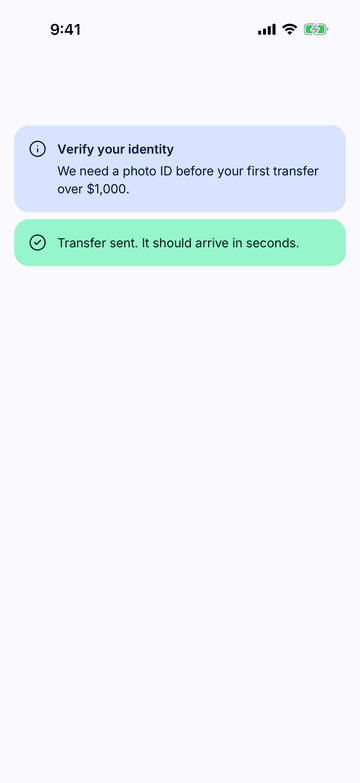
iPhone (iOS simulator)
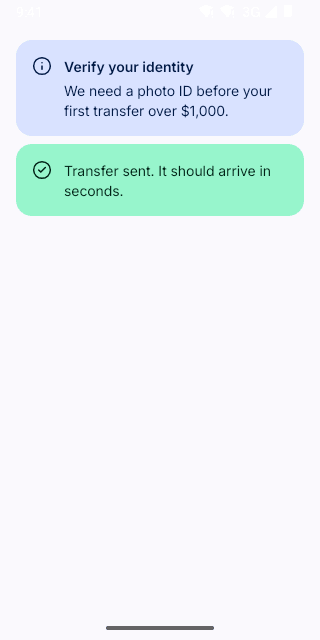
Pixel (Android emulator)
Screenshots from the latest CI run of the showcase app; the live frame renders the same code for the web.
Banner props
| Prop | Type | Default | Description |
|---|---|---|---|
| title | string | — | — |
| children | React.ReactNode | — | — |
| tone | ToneValue | — | — |
| action | React.ReactNode | — | One action, e.g. <Button variant="text">Review</Button>. |
| onDismiss | () => void | — | — |