Patterns · Auth
AuthCard
Since v0.0.1
Authentication layout pattern. Wraps sign-in, sign-up, and reset flows in a centered card.
import { AuthCard } from '@nexub/patterns';Examples
Sign in
Props
| Prop | Type | Default | Description |
|---|---|---|---|
| titlerequired | string | — | Card heading (e.g. "Sign in to Nexub"). |
| description | string | — | Subheading text. |
| logo | React.ReactNode | — | Logo or brand mark above the title. |
| footer | React.ReactNode | — | Footer content (e.g. "Don't have an account?"). |
| childrenrequired | React.ReactNode | — | Form content. |
On iOS & Android: SignInScreen
@nexub/react-native/patternsAlpha
import { SignInScreen } from '@nexub/react-native/patterns';

<SignInScreen onSubmit={signIn} onBiometric={unlock} biometricLabel="Sign in with Face ID" error={error} />
Web vs mobile
Same tokens and prop names. Where the platforms differ:
| Web | iOS & Android | |
|---|---|---|
| Layout | A centred card on a page. | A full screen with the action pinned above the keyboard. |
| Biometrics | Passkeys through the browser. | onBiometric + biometricLabel for Face ID or fingerprint. |
Interactive preview of @nexub/react-native rendered for the web. Native chrome (switches, pickers, Liquid Glass) looks like the platform on a device.
On device
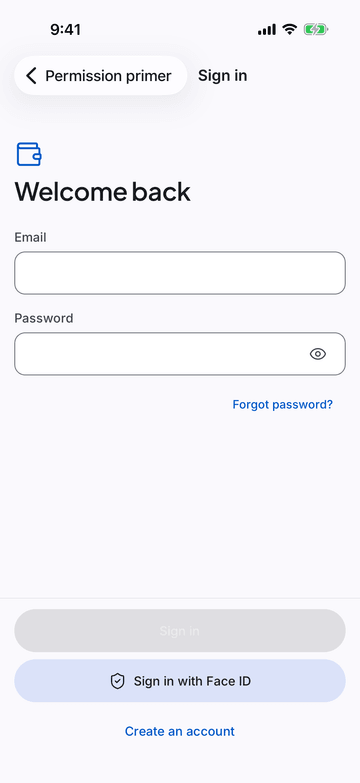
iPhone (iOS simulator)
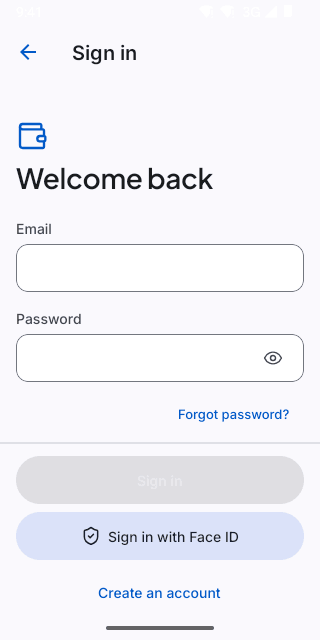
Pixel (Android emulator)
Screenshots from the latest CI run of the showcase app; the live frame renders the same code for the web.
SignInScreen props
| Prop | Type | Default | Description |
|---|---|---|---|
| onSubmitrequired | (email: string, password: string) => void | — | — |
| biometricLabel | string | — | Offer passkey/biometric sign-in (name the method: "Sign in with Face ID"). |
| onBiometric | () => void | — | — |
| onForgotPassword | () => void | — | — |
| onCreateAccount | () => void | — | — |
| loading | boolean | — | — |
| error | string | — | — |
| logo | React.ReactNode | — | — |
| title | string | 'Sign in' | Copy overrides. |
| submitLabel | string | 'Sign in' | — |