Patterns · Layout
SettingsSection
Since v0.0.1
Grouped settings panel with title, description, and action area.
import { SettingsSection } from '@nexub/patterns';Examples
Default
Props
| Prop | Type | Default | Description |
|---|---|---|---|
| titlerequired | string | — | Section heading. |
| description | string | — | Supporting description for the section. |
| childrenrequired | React.ReactNode | — | Settings controls. |
| action | React.ReactNode | — | Primary action (e.g. save button). |
On iOS & Android: SettingsScreen
@nexub/react-native/patternsAlpha
import { SettingsScreen } from '@nexub/react-native/patterns';

<SettingsScreen groups={[{ header: 'Security', items: [{ title: 'Face ID', variant: 'switch', checked: faceId, onCheckedChange: setFaceId }] }]} />
Web vs mobile
Same tokens and prop names. Where the platforms differ:
| Web | iOS & Android | |
|---|---|---|
| Rows | SettingsSection rows with controls. | Inset-grouped ListSections of ListItems, like iOS Settings. |
Interactive preview of @nexub/react-native rendered for the web. Native chrome (switches, pickers, Liquid Glass) looks like the platform on a device.
On device
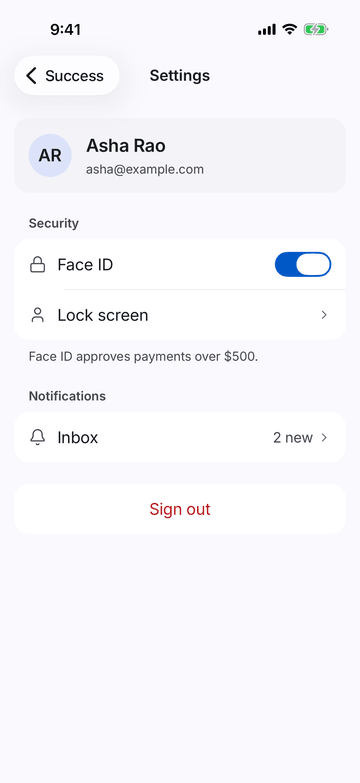
iPhone (iOS simulator)
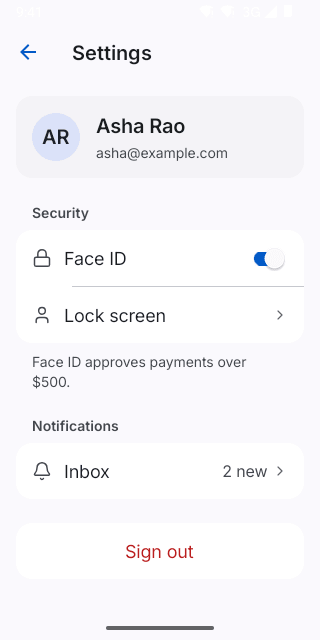
Pixel (Android emulator)
Screenshots from the latest CI run of the showcase app; the live frame renders the same code for the web.
SettingsScreen props
| Prop | Type | Default | Description |
|---|---|---|---|
| header | React.ReactNode | — | Optional profile row/card above the groups. |
| groupsrequired | SettingsGroup[] | — | — |