Patterns · Marketing
PlanCard
Since v0.0.1
Pricing plan card with feature checklist, badge, and CTA button.
import { PlanCard } from '@nexub/patterns';Examples
Default
Props
| Prop | Type | Default | Description |
|---|---|---|---|
| namerequired | string | — | Plan name (e.g. "Pro"). |
| pricerequired | string | — | Price string (e.g. "$49/mo"). |
| description | string | — | Short plan description. |
| features | string[] | — | List of included features. |
| highlighted | boolean | false | Applies brand accent styling for recommended plans. |
| badge | string | — | Label for the plan badge (e.g. "Most Popular"). |
| ctaLabel | string | 'Get started' | CTA button label. |
| onCta | () => void | — | CTA button click handler. |
On iOS & Android: PaywallScreen
@nexub/react-native/patternsAlpha
import { PaywallScreen } from '@nexub/react-native/patterns';

<PaywallScreen title="Payub Plus" plans={plans} onSubscribe={buy} onRestore={restore} />
Web vs mobile
Same tokens and prop names. Where the platforms differ:
| Web | iOS & Android | |
|---|---|---|
| Scope | One PlanCard per plan, laid out by you. | The whole paywall: plans, subscribe, restore purchases, terms (App Store rules). |
Interactive preview of @nexub/react-native rendered for the web. Native chrome (switches, pickers, Liquid Glass) looks like the platform on a device.
On device
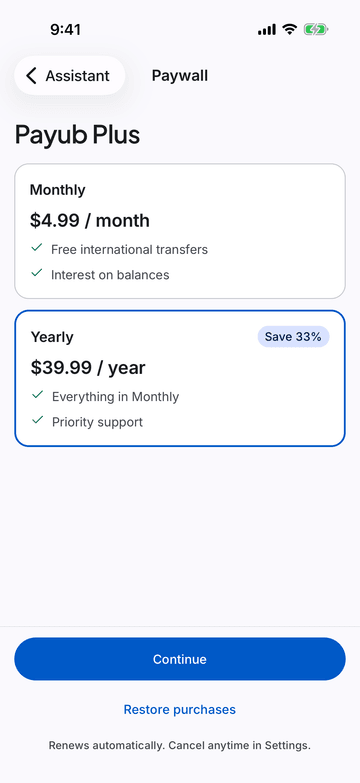
iPhone (iOS simulator)
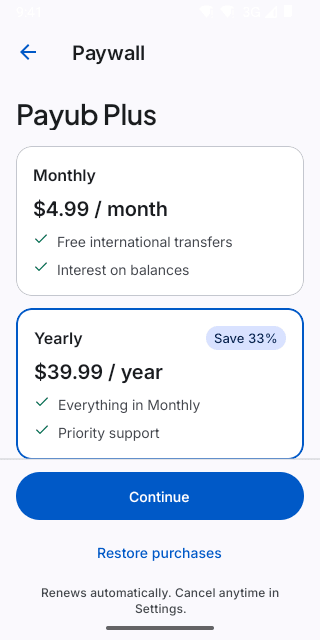
Pixel (Android emulator)
Screenshots from the latest CI run of the showcase app; the live frame renders the same code for the web.
PaywallScreen props
| Prop | Type | Default | Description |
|---|---|---|---|
| titlerequired | string | — | — |
| plansrequired | Plan[] | — | — |
| defaultPlan | string | — | — |
| onSubscriberequired | (planId: string) => void | — | — |
| onRestore | () => void | — | — |
| terms | string | — | Legal copy (auto-renewal terms). |