Patterns · Feedback
NotificationItem
Since v0.0.1
Single notification row for notification panels or dropdowns.
import { NotificationItem } from '@nexub/patterns';Examples
Default
Props
| Prop | Type | Default | Description |
|---|---|---|---|
| titlerequired | string | — | Notification title. |
| description | string | — | Supporting text. |
| timestamp | string | — | Relative time string. |
| unread | boolean | false | Applies unread indicator styling. |
| avatar | React.ReactNode | — | Avatar for the notification actor. |
| onClick | () => void | — | Click handler for the item. |
On iOS & Android: NotificationsInbox
@nexub/react-native/patternsAlpha
import { NotificationsInbox } from '@nexub/react-native/patterns';

<NotificationsInbox notifications={items} onPress={open} onMarkAllRead={markAll} />
Web vs mobile
Same tokens and prop names. Where the platforms differ:
| Web | iOS & Android | |
|---|---|---|
| Scope | One NotificationItem; lay out the list yourself. | The whole inbox with "Mark all read". |
Interactive preview of @nexub/react-native rendered for the web. Native chrome (switches, pickers, Liquid Glass) looks like the platform on a device.
On device
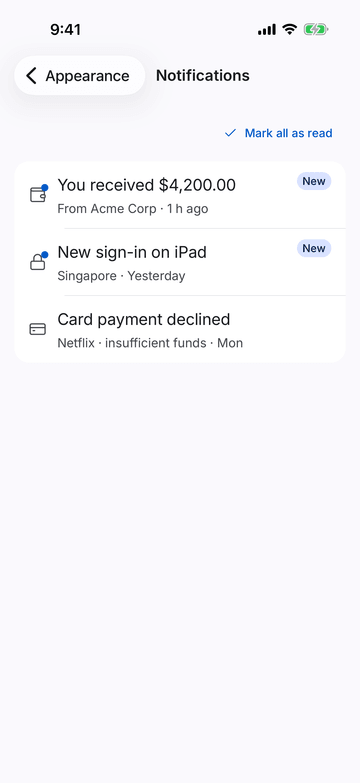
iPhone (iOS simulator)
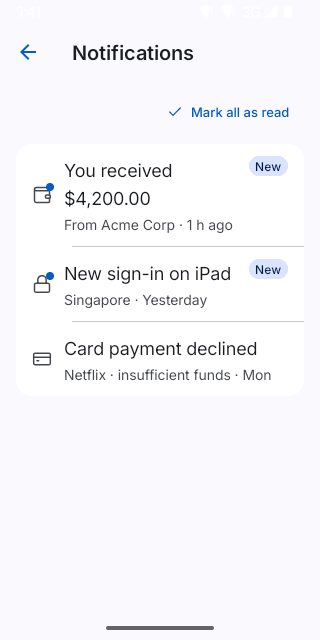
Pixel (Android emulator)
Screenshots from the latest CI run of the showcase app; the live frame renders the same code for the web.
NotificationsInbox props
| Prop | Type | Default | Description |
|---|---|---|---|
| notificationsrequired | NotificationEntry[] | — | — |
| onPress | (n: NotificationEntry) => void | — | — |
| onMarkAllRead | () => void | — | — |